

Most engineers treat Parquet as a black box. Write DataFrame, read DataFrame, hope it’s fast. But the difference between a well-configured Parquet setup and a naive one can be the difference between queries that take seconds and queries that take minutes.
Understanding what happens inside the file is how you unlock that performance.
Why Storage Layout Matters
At the logical level, data is simple: tables with rows and columns. But how you physically arrange bytes on disk has massive performance implications.
Consider a typical analytics query: “What’s the average order value by country?” You need two columns out of a wide table with dozens of fields.
Row-wise storage (how traditional databases work) lays data out like this:
[row1_col1, row1_col2, ... row1_colN] [row2_col1, row2_col2, ... row2_colN] ...To read your two columns, you scan through every column for every row. Most of that I/O is wasted on data you’ll immediately discard.
Columnar storage inverts the layout:
[row1_col1, row2_col1, row3_col1, ...] [row1_col2, row2_col2, ...] ...Now reading two columns means reading two contiguous blocks. You only touch the data you actually need. Query engines call this projection pushdown, and columnar formats make it efficient.
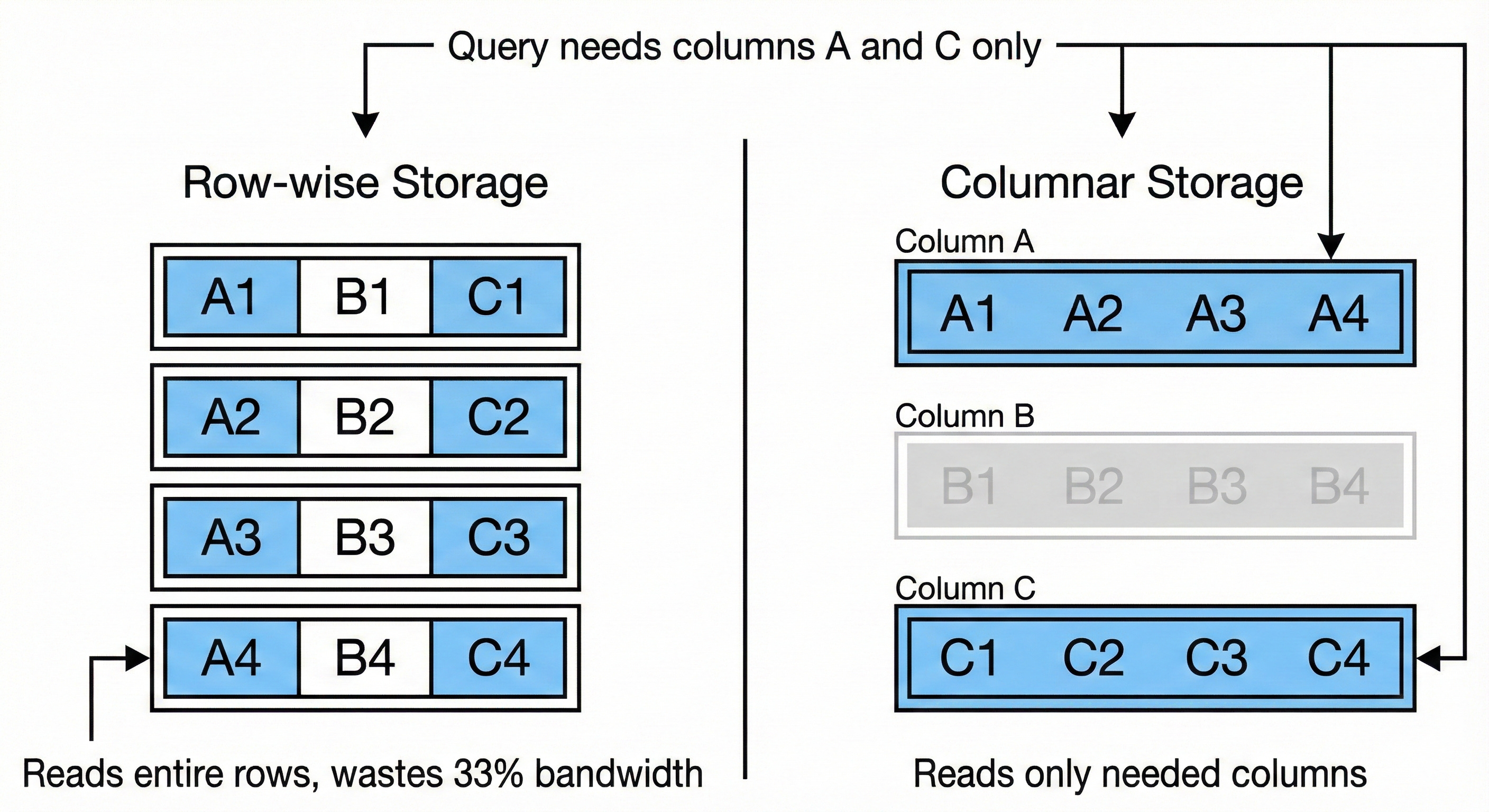
The tradeoff: Row-wise storage excels at transactional workloads (insert a record, update a field). Columnar storage excels at analytical workloads (aggregate millions of rows, but only a few columns). Different access patterns, different optimal layouts.
The Locality Problem with Pure Columnar
Imagine reconstructing a single row from a 100GB columnar file with 10 columns. Column A is in the first 10GB. Column B is 10GB away. Column J is 90GB away. You’ve lost all data locality.
Modern hardware is built around locality. CPU caches, memory prefetching, disk read-ahead - they assume if you read address X, you’ll want X+1 soon. Scattered access defeats these optimizations.
Parquet solves this with a hybrid model: divide rows into groups (typically 128MB), then store each group in columnar format. You get columnar benefits within each group, plus locality across groups.
Inside a Parquet File
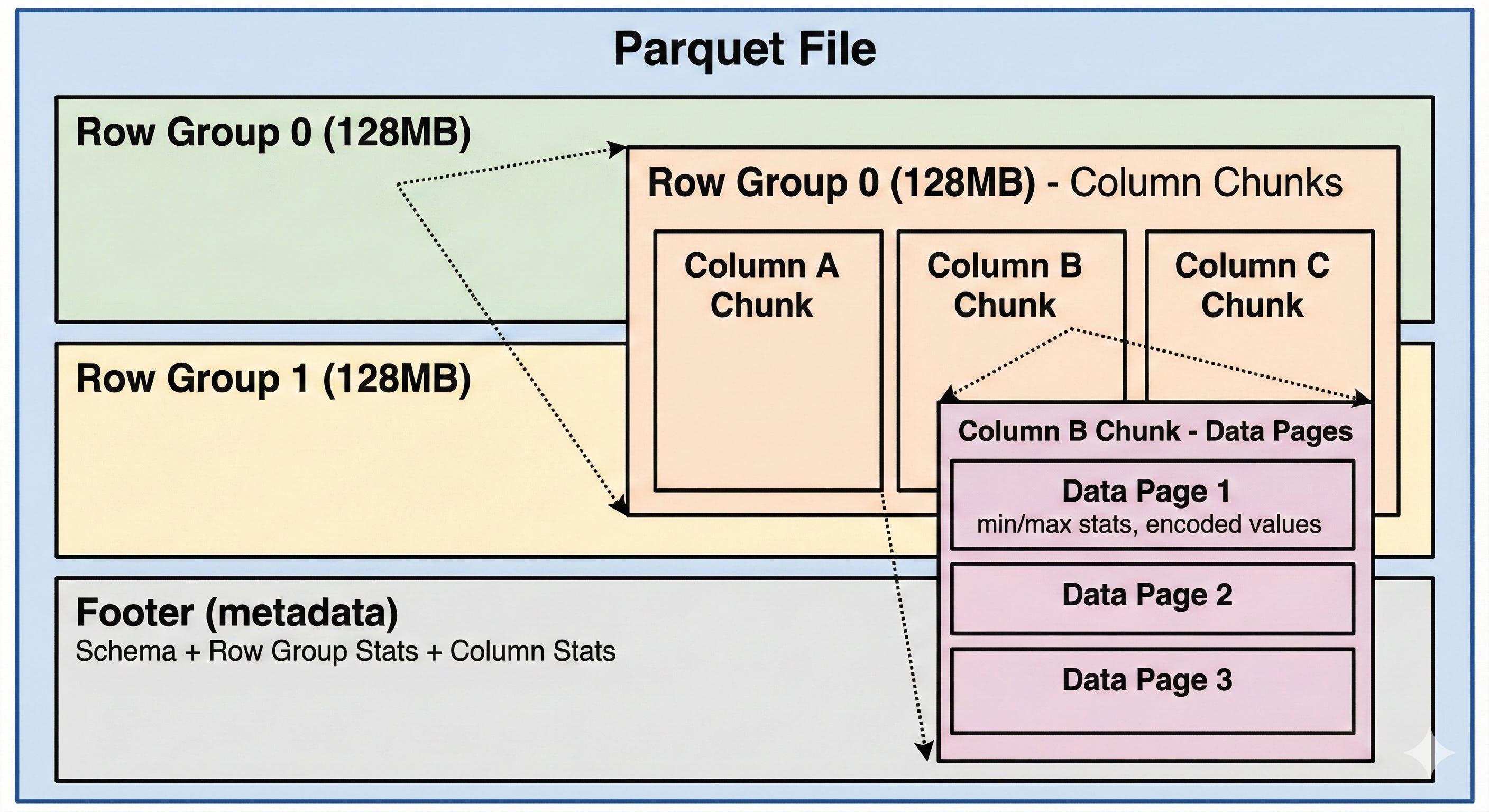
A Parquet dataset is often a directory containing multiple .parquet files. Within each file:
Row Groups are horizontal partitions, typically 128MB each. They contain a subset of rows with all their columns.
Column Chunks are vertical partitions within a row group. Each chunk contains all values for one column in that group.
Data Pages are the actual storage units within column chunks - encoded values plus metadata like min/max statistics.
Footer stores all metadata: schema, row group locations, and statistics. Reading the footer first lets you plan which parts of the file to actually read.
How Parquet Compresses Data
Columnar layout enables compression techniques that don’t work well on row-wise data. When values from the same column sit together, they share the same type and often similar distributions.
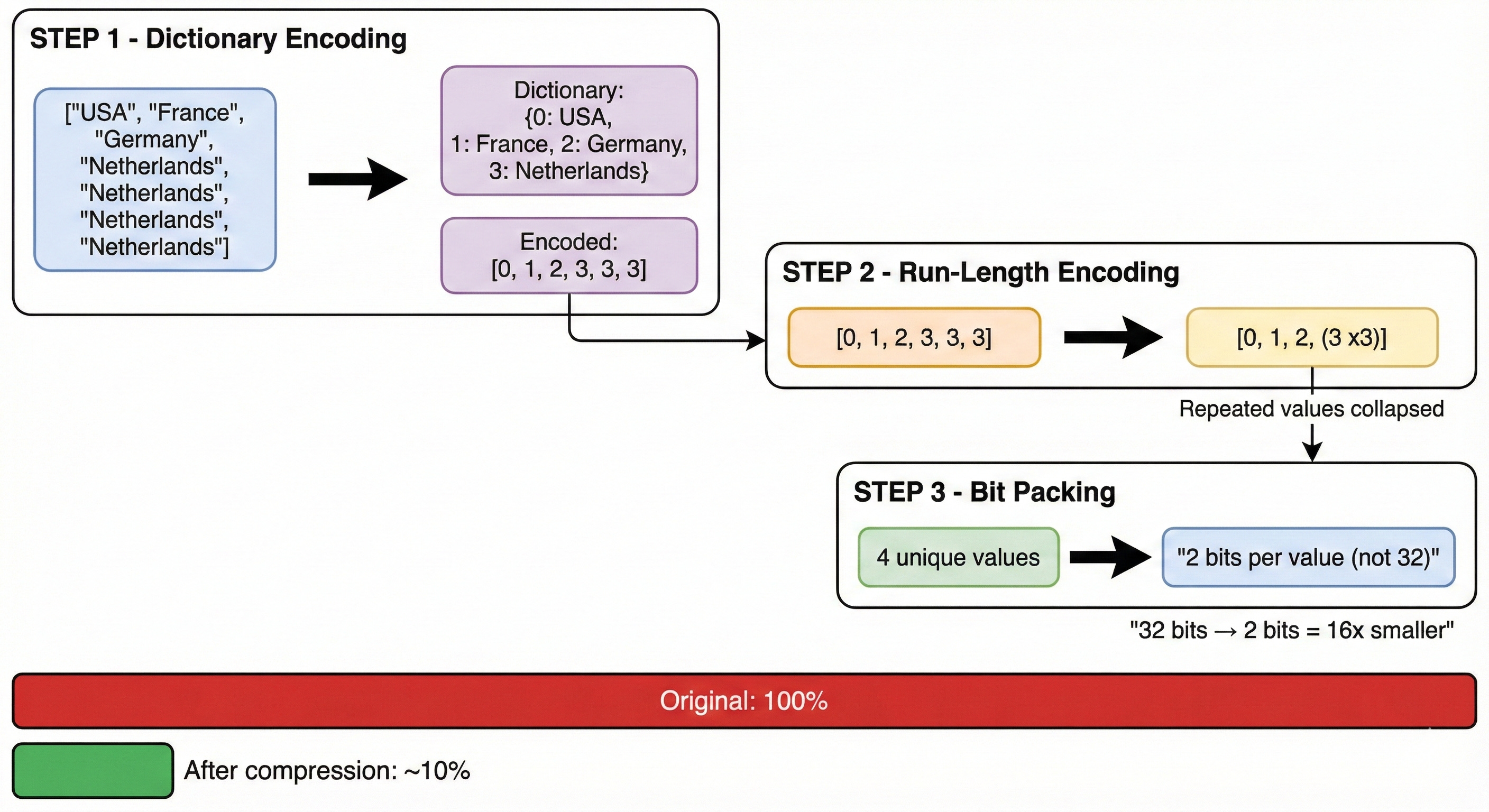
Parquet applies three techniques in sequence:
1. Dictionary Encoding
Original: [”USA”, “France”, “Germany”, “Netherlands”, “Netherlands”, “Netherlands”]

Dictionary: {0: “USA”, 1: “France”, 2: “Germany”, 3: “Netherlands”}
Encoded: [0, 1, 2, 3, 3, 3]
Repeated string values become small integer references. Within each row group, a “country” column stores each unique value just once in its dictionary.
2. Run-Length Encoding
Before: [3, 3, 3]
After: (value=3, count=3)
Consecutive identical values collapse into (value, count) pairs. Especially powerful on sorted data where similar values cluster.
3. Bit Packing
4 unique values in dictionary = 2 bits needed per reference (not 32)With a small dictionary, each reference needs only log2(dictionary_size) bits instead of a full integer.
Watch out: Dictionary encoding has a size limit per column chunk. If you exceed it (too many unique values), Parquet falls back to plain encoding and loses compression benefits. Fix this by increasing dictionary page size or decreasing row group size.
On top of encoding, Parquet supports page-level compression (Snappy, GZIP, LZ4). A benchmark from S3: reading 10GB uncompressed took ~14 seconds; the same data with Snappy compression took ~8 seconds. Smaller files mean less I/O, even accounting for decompression CPU cost.
Skipping Data with Statistics
Compression reduces file size. But the bigger wins come from not reading data at all.
Every row group stores min/max statistics in the footer. For a query like WHERE user_id > 1000, Parquet checks each row group before reading:
Row Group 0 (min: 0, max: 900)
→ SKIP - max value 900 is below 1000Row Group 1 (min: 850, max: 2100)
→ READ - range overlaps with predicateRow Group 2 (min: 1, max: 400)
→ SKIP - max value 400 is below 1000
Each skipped row group is 128MB you don’t read. On sorted data, row group skipping can eliminate most of your I/O.
Important: This only works well when data is sorted or clustered on the filter column. Randomly distributed data produces wide min/max ranges that overlap with most predicates, defeating the optimization.
For equality predicates (WHERE country = 'Germany'), Parquet offers dictionary filtering: check if the value exists in the column chunk’s dictionary before reading any data pages. If it’s absent, skip with certainty.
The Small Files Problem
Every Parquet file has overhead: connection setup, reader instantiation, footer parsing. With a few large files, this overhead is negligible. With thousands of small files, it dominates query time.
Benchmark (10GB dataset on S3):

16 files: ~12.5 seconds
1,024 files: ~19 seconds

Same data, 50% slower due to file overhead.
Small files accumulate naturally. Hourly ETL jobs create a new file each run. Streaming ingestion creates small batches. Partitioning on high-cardinality columns fragments data across directories. After months, you have tens of thousands of files.
The opposite extreme is also problematic. One team consolidated 250GB into a single file. A simple COUNT(*) went from 5 minutes to over an hour. The culprit: footer processing. Massive files have massive metadata (thousands of row groups), and Parquet’s footer parsing isn’t optimized for that scale.
Sweet spot: Target files in the 128MB to 1GB range. Compact small files periodically. Split oversized files.
Directory Partitioning
When you know your query patterns upfront, embed predicates in the directory structure:
/data/events/
  date=2024-01-15/
    part-00000.parquet
  date=2024-01-16/
    part-00000.parquet
A query filtering on date doesn’t open irrelevant directories. Predicate evaluation becomes file listing.
The tradeoff: partitioning on high-cardinality columns (user_id, timestamp) creates thousands of directories with tiny files. Use partitioning for low-cardinality columns you frequently filter on (date, region, status).
Practical Optimization Checklist
Reduce file size:
Enable compression (Snappy is usually the right default)
Monitor dictionary encoding fallback on high-cardinality columns
Only SELECT columns you need - projection pushdown requires it
Enable data skipping:
Sort data on commonly filtered columns for tighter min/max ranges
Use typed predicates matching column types (avoid implicit casting)
Partition by low-cardinality, frequently-filtered columns
Manage file count:
Compact small files from incremental writes
Avoid single massive files (footer parsing bottleneck)
Consider Delta Lake or Iceberg for automatic compaction and better metadata handling
The Takeaway
Parquet’s performance comes from a set of deliberate tradeoffs: columnar layout for projection pushdown, encoding for compression, statistics for skipping. These optimizations are automatic, but they only work well when your data organization matches your access patterns.
Sort your data on filter columns. Keep file sizes reasonable. Select only the columns you need. The format will do the rest.
Go deeper on data engineering fundamentals @ System Overflow